

ServicesApplied AI

We bridge the gap.

Turn AI use into measurable business results. SystemsGo combines practical training with leadership working sessions and hands-on workflow consulting. Your team learns to use AI in daily work, applies it to a real process, and measures whether the improvement pays off.

Your team uses the tools. But they’re not being measured.

An employee can work faster while the next person spends longer checking their work. The opportunity is to improve the whole process: its inputs, decisions, review, and handoffs.

80%of respondents said AI improved their individual productivity.

37%reported a contribution from AI to their organization’s earnings before interest and taxes (EBIT).

McKinsey, State of AI 2026. 1,719 respondents across 97 countries; surveyed May-June 2026. Read the research (opens in a new tab)

56% of CEOs reported no significant financial benefit from AI to date in PwC’s 2026 survey.

PwC Global CEO Survey, January 2026 (opens in a new tab). 4,454 CEOs across 95 countries and territories.

These surveys use different populations and measures. They do not form a combined benchmark or forecast your results.

Learning and implementation, built around your team.

Build your team’s AI skills and put them to work on a process that matters to your business.

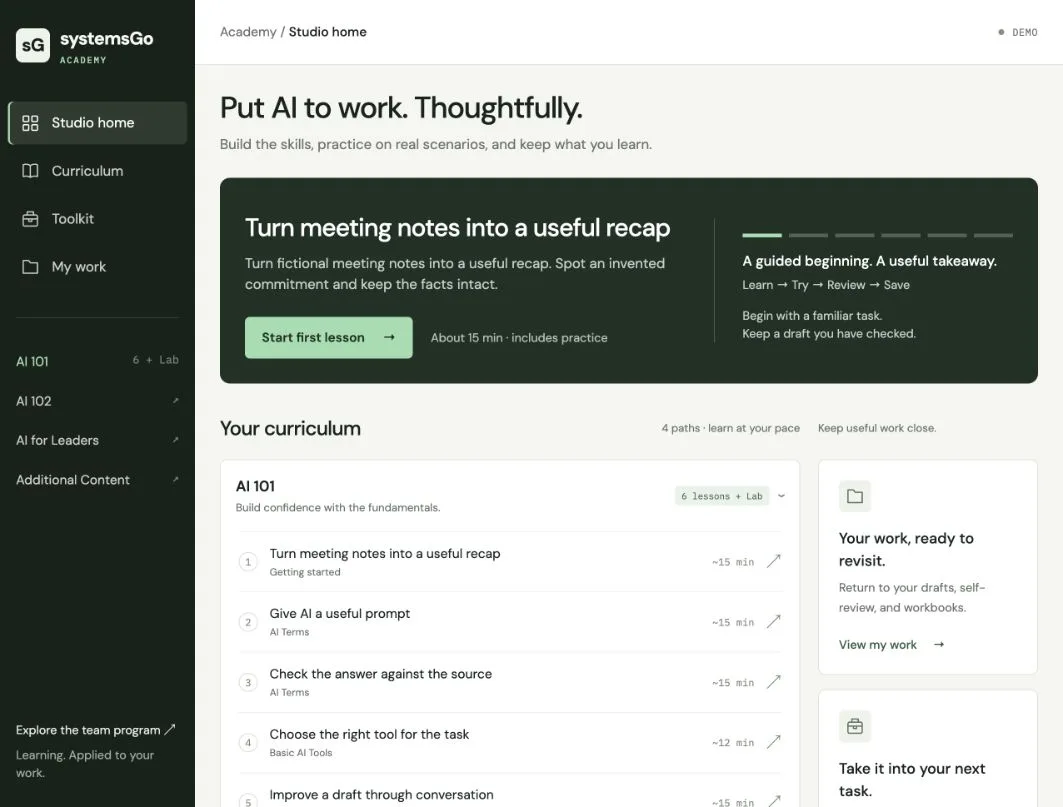
SystemsGo academy showing the six AI 101 starter lessons and saved-work resources

A guided academy

Practice on familiar work, from checking meeting notes to writing a useful prompt. Learn to connect approved tools to company information. In Labs, turn a recurring task into instructions your team can reuse.

Preview the academy (opens in a new tab)

Leadership working sessions

Choose a workflow with us, agree on the result you want, and give someone responsibility for it. Review progress together and decide where to invest next.

Hands-on workflow consulting

Work with us and the people doing the job to connect the steps around AI. Clarify who provides the information, who checks the result, and what happens next.

Resources your team keeps

Keep the prompts, checking guides, and reusable instructions you develop. Return to them when the same work comes around again.

Start with the work. Stay for the result.

We help your team learn the skills, apply them to real workflows, and assess the results with leadership.

  1. Choose a result worth improving

    Together, we choose a recurring workflow and an owner. We track the process step by step, identifying bottlenecks with our evaluation criteria. Then we agree on a fix.

  2. Build the skills through practice

    Your team works through an example, tries the task, and checks the result. Coaching helps people turn what works into prompts and instructions they can use again.

  3. Apply it in the workflow

    We help your team connect approved tools to the information it needs. We define where people review the work and test how the process handles missing information or errors.

  4. Measure, improve, and repeat

    We compare the workflow with its starting point, including delays, rework, and running costs. Your team decides what to expand, change, or stop.

How we developed the curriculum.

We developed the curriculum through hands-on work with team members and experience founding AI Champions Groups. These groups help colleagues share approaches, work through questions, and put AI into daily practice.

Lessons follow that same approach. Learners work through a familiar example, try a task themselves, and check the result. They keep prompts and instructions they can use again. Feedback from hands-on work helps us refine the lessons.

The curriculum progresses from prompting and verification to connecting approved tools and building reusable skills. Vendor documentation informs the tool guidance. Research from BCG and HubSpot informs our approach to training and adoption.

BCG: AI at Work, 2025 (opens in a new tab)HubSpot’s account of its AI transformation (opens in a new tab)

What you’ll learn in AI 101

  • Understand the toolsLearn AI terms in context, choose a suitable tool, and recognize what it can and cannot know.
  • Prompt with purposeDefine the task, give useful context, and describe what a good result looks like.
  • Check before you rely on itCompare claims with sources, spot hallucinations, and revise the output with your own judgment.
  • Use company information safelyLearn how connectors give AI access to approved company tools and information, what MCP does, and when an action needs your approval.
  • Make good work repeatableCreate a skill: reusable instructions for a recurring task. Test it in a practical Lab and keep it for future work.

What you’ll learn in AI 101

  • Understand the toolsLearn AI terms in context, choose a suitable tool, and recognize what it can and cannot know.
  • Prompt with purposeDefine the task, give useful context, and describe what a good result looks like.
  • Check before you rely on itCompare claims with sources, spot hallucinations, and revise the output with your own judgment.
  • Use company information safelyLearn how connectors give AI access to approved company tools and information, what MCP does, and when an action needs your approval.
  • Make good work repeatableCreate a skill: reusable instructions for a recurring task. Test it in a practical Lab and keep it for future work.

Preview the academy layout and course roadmap.

Preview the academy (opens in a new tab)

Build good judgment into everyday AI use.

Security isn’t just a single course. It’s part of everything we do.

Your team needs to know what information AI can use, which tools are approved, and when a person needs to review the result. Our academy turns those decisions into practical exercises, from preparing a customer update to checking access and approvals in a connected workflow.

Employees practice protecting information in AI 101. AI 102 extends that foundation to data access, agent permissions, approval points, and failure testing.

Your team works faster. Your business should perform better.

AI can help someone finish a task faster. The financial value depends on what happens next.

We help your team improve the tasks that matter, connect them into better workflows, and measure what changes for the business. Then we help you check the financial effect against the cost of making and maintaining that improvement.

Verify the value
Measure the change
Connect the steps
Request
Improve the work
Prepare

A better task. Useful inputs. A checked output.

Review
Deliver

One connected workflow. Clear owners, review decisions, and handoffs.

CustomerDo they reach value sooner?
TeamCan they deliver more, reliably?
QualityDoes less work come back?
Verified financial benefitWhat changed
Full costWhat it takes
Net financial impactWhat it’s worth

Full cost includes software, implementation, training, review, and ongoing support.

  1. Choose a task worth improving.

    Start with a recurring task that matters to the workflow. Give it reliable inputs, define a useful output, and keep the review that protects quality.

    Check time spent, corrections, and review effort.

When the work needs more than training.

Some workflows need an agent or a safe connection to your data. We build those too, inside the tools your team already uses.

  • Agents in daily work

    Agents that prepare the call, write the notes back to the record and keep fields current. They run inside your CRM and Slack, where your team already works.

    • Call prep
    • Call notes
    • Record upkeep
    • Follow-up drafts
  • AI access to your data

    We set up MCP servers, a standard way to give AI tools controlled access to your systems, so the assistant your team already uses can answer from your CRM and warehouse with the permissions you set.

    • MCP servers
    • Read-only by default
    • Audit log

Where should your team start?

Answer six questions about how your team uses AI today. Get an immediate report with two priorities and a suggested first pilot. Download it or share it with your team to compare perspectives.

Get your readiness report

About three minutes. No email required.

Your report reflects your answers and helps you plan the next step. It doesn’t predict ROI.

Bring a workflow you want to improve.

Tell us where the work gets stuck and what a better result would look like. We can discuss how training and hands-on support could help.